
You know you need a website. You have known for months. The problem was never wanting one, it was the wall you hit the moment you opened a builder: a blank canvas, a hundred layout choices, and an empty headline box waiting for words you do not have time to write. So the site stays a someday project while you send people to your Instagram bio instead. This is the exact gap an AI website builder is meant to close: instead of handing you an empty page, it asks a few questions and writes the first draft for you.
That matters because the cost of not having a real site is measurable. Research from the Stanford Web Credibility Project found that 75% of users judge a company's credibility based on its website design, and people form that judgment in the first seconds. For a coach, consultant, trainer, or tradesperson whose next client is Googling them right now, "no website" and "a link list" both read as "not quite a real business yet." An AI website builder removes the reason most solo professionals never fix that: the blank page.
This guide covers what you actually need to decide whether an AI website builder is right for you:
- What an AI website builder is and how it works under the hood
- What the AI does genuinely well, and where it still needs you
- AI website builders vs traditional drag-and-drop builders
- How to choose one without getting burned by marketing claims
- A step-by-step path to a live, professional site
- The tools worth knowing, and which kind of user each one fits
By the end, you will understand how these tools work, know what to look for, and be able to get a credible professional page live in a single sitting instead of putting it off for another six months.
What Is an AI Website Builder and How Does It Work?
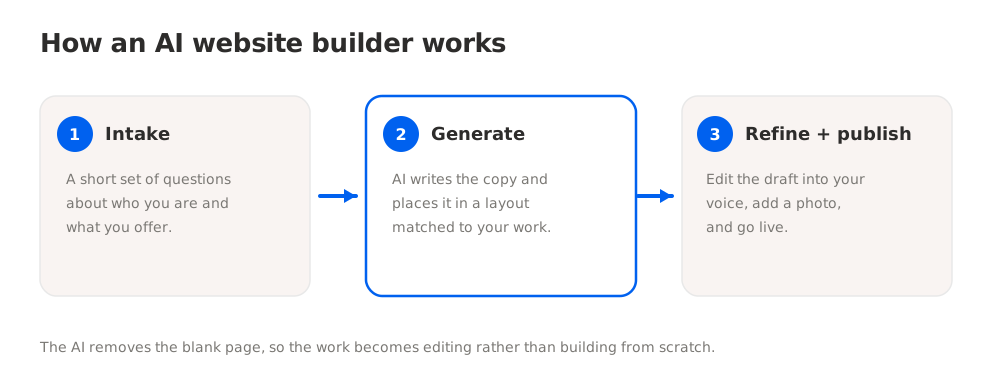
An AI website builder is a website tool that generates your page content and layout automatically from a short set of inputs, instead of making you design and write everything from scratch. You answer a few questions about who you are and what you do, and the AI produces a first draft: a headline, an about section, a services or offer block, and a call to action, arranged in a clean layout. You review it, adjust anything that does not sound like you, add a photo, and publish.
The mechanics are simpler than the marketing suggests. Most AI website builders work in three stages.
First, intake. The tool asks a handful of structured questions: your name, your profession, who you help, what you offer, and how people should get in touch. Some tools use a short chat instead of a form, but the goal is the same, gathering enough about you to write.
Second, generation. A language model turns those answers into finished copy, warm and specific rather than placeholder text, then places that copy into a pre-built layout matched to your type of business. This is the part that used to take a copywriter and a designer. The AI does the drafting in seconds.
Third, refine and publish. You get a live preview you can edit. You fix the wording, swap the photo, tweak the CTA, and publish to a web address. Good tools keep this step to minutes because the heavy lifting, the blank-page problem, is already solved.
Why this matters for solo professionals
For a solo professional, the value of an AI website builder is not novelty, it is time and confidence. The two things that stall a website are not knowing what to write and not knowing how to lay it out. An AI website builder answers both in one pass. A coach who has rewritten her bio eleven times gets a clean draft to react to instead of a blank box. A tradesperson who would never open a design tool gets a finished page from answering questions like a form.
Without one, the usual outcome is no site at all, or a link-in-bio page that does not build trust. With one, a credible, findable page becomes a task you finish in an afternoon. That is the shift: from "build a website," a project, to "answer a few questions and review the result," a task. For anyone who charges for their time, closing that gap is the whole point.
AI Website Builders vs Traditional Drag-and-Drop Builders
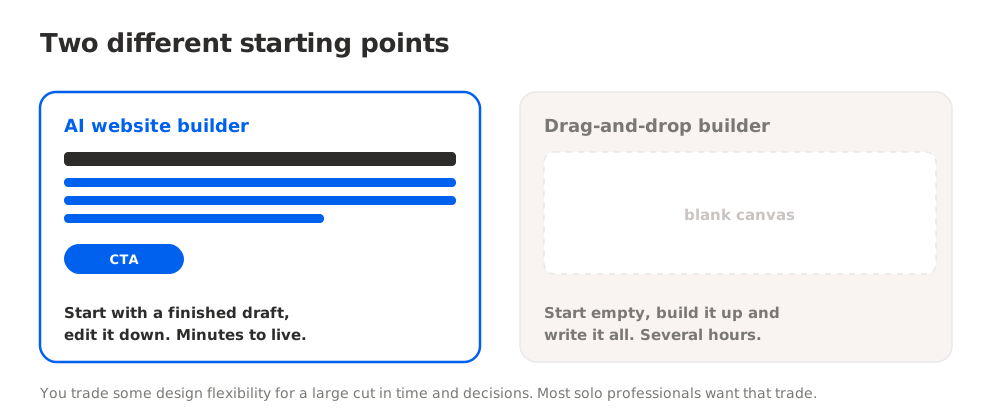
The honest way to understand an AI website builder is to compare it to what came before: the traditional drag-and-drop builder like Wix or Squarespace. Both can produce a good site. They ask very different things of you.
A traditional builder gives you a canvas and tools. You choose a template, then move blocks, pick fonts, adjust spacing, and, critically, write every word yourself. The ceiling is high, you can build almost anything, but so is the effort. Squarespace sites routinely take one to two hours or more before they look right, and that is before you have written a single line of copy. The blank headline box is still yours to fill.
An AI website builder inverts the starting point. Instead of an empty canvas, you start with a finished draft and edit down. You trade some design flexibility for a massive reduction in time and decisions. For a solo professional who needs one credible page, not a custom multi-page site, that trade is usually worth it.
Here is how the two approaches compare on the things that actually decide whether your site gets finished.
| Factor | AI website builder | Traditional drag-and-drop builder |
|---|---|---|
| Starting point | Finished draft from your answers | Blank canvas or empty template |
| Copywriting | AI writes the first draft | You write everything |
| Time to live | Minutes to about an hour | Several hours, often longer |
| Design decisions | Few, layout is pre-matched | Many, you make them all |
| Flexibility ceiling | Lower, opinionated by design | Higher, near-unlimited |
| Best for | One credible page, fast | Custom, multi-page, design-led sites |
The takeaway is not that one is better in the abstract. It is that they suit different jobs. If you want a large, custom, design-forward site and you enjoy building, a traditional builder earns its hours. If you want to look credible and be findable without the project, an AI website builder for small business is the faster path. Most solo professionals are in the second group and just have not been told the first group is optional.
What an AI Website Builder Does Well (and Where It Still Needs You)
Being clear-eyed about the strengths and limits of an AI website builder saves you from both under-using it and expecting magic.
Where it genuinely delivers:
- Beating the blank page. The single biggest win. It turns "I do not know what to write" into "let me tweak this draft," which is a far easier task.
- Speed to live. A credible page in minutes instead of a project that slips for months.
- Coherent first draft. Headline, about, offer, and CTA that hang together, in a layout already suited to your kind of business.
- Lowering the skill bar. No design literacy and no copywriting confidence required to get started.
Where it still needs a human, you:
- Your voice and specifics. The AI writes a strong general draft. The details that make it yours, your actual results, your real promise, the phrase a client once used about you, come from you editing. Read every line and make it sound like a person, not a template.
- Accuracy. AI can write a confident sentence that is not quite true about your services or pricing. You own the fact-check.
- Judgment on scope. The AI will happily fill a page. Deciding what to leave off, so the page stays focused on one clear action, is your call.
- Photos and proof. A real headshot, real project photos, and a genuine testimonial do more for trust than any generated copy. The AI cannot supply those.
The mistake is treating the AI draft as finished. The right model is "AI drafts, you direct." The tools that respect this keep editing fast and obvious, so the ten minutes you save on writing do not get eaten by fighting the editor afterward.
How to Choose an AI Website Builder: Step by Step
Picking an AI website builder is less about the flashiest demo and more about matching the tool to what you actually need. Here is a concrete path.
Step 1: Define the job, one page or a platform
Start by being honest about scope. Do you need one credible, findable page that says who you are and how to reach you? Or do you need a multi-page site with a blog, a store, and complex navigation? Most solo professionals need the former and get sold the latter. The most common and expensive mistake is buying a heavy platform for a one-page job. Decide this first, because it eliminates most of the market immediately.
Step 2: Check what the AI actually generates
"AI-powered" is on almost every builder now, and it means very different things. Some tools use AI for a single suggestion and still leave you the blank page. Others generate the whole first draft, copy and layout, from your answers. Ask the real question: after onboarding, do I have a finished page to edit, or an empty one to build? A true AI website generator gives you the former. Read the demo carefully; marketing blurs this on purpose.
Step 3: Weigh speed against flexibility
Match the tool to your priority. If your priority is being live and credible this week, choose a tool built for speed, one that gets you to a good page in minutes. If your priority is pixel-level design control, accept that you are choosing a slower, more hands-on tool. You cannot fully maximize both at once, and pretending otherwise is how people end up with a half-built site. For a professional who needs to look real fast, speed wins, and a builder like NiftySite is built around exactly that: answer a few questions, get a finished page, live in about ten minutes.
Step 4: Check the billing and lock-in
Look closely at pricing and billing before you commit. Some builders push annual upfront billing, which locks you in for a year. Others charge monthly with no commitment. Watch for first-year promo rates that jump at renewal, and for a free tier that actually publishes a real page versus one that hides your site behind a trial countdown. A free plan you can publish on and keep, with monthly billing when you upgrade, is the low-risk way to try before you pay.
Step 5: Confirm you can be found
A pretty page nobody can find is a brochure in a drawer. Check that the tool gives you a real, shareable web address, and that published pages can be indexed by Google so you show up in search. Some link-in-bio style tools generate a page that search engines effectively ignore. If getting found matters, and for most solo professionals it does, this is not optional.
Step 6: Publish, then refine
Do not wait for perfect. Get the AI draft live, share the link, and refine from there. A credible page live today, edited over the next week, beats an immaculate one that launches next quarter. The whole advantage of an AI website builder is momentum. Use it.
The Best AI Website Builders and Who They Fit
The "best AI website builder" depends entirely on whether you want a fast one-page professional site or a heavier all-in-one platform. Here is an honest breakdown of the main options and who each suits.
| Tool | Best For | Starting Price | Setup Time |
|---|---|---|---|
| NiftySite | One credible professional page, fast | Free / $15 per month | About 10 minutes |
| Durable | AI site plus built-in CRM and invoicing | Free / paid monthly | Under an hour |
| B12 | Professional-services firm wanting AI site plus CRM | Free / higher monthly | Days, team-assisted |
| Wix | Maximum design flexibility, AI as an assist | Paid, annual-led | Several hours |
| Squarespace | Design-led custom sites, willing to configure | Paid monthly | One to two hours plus |
For a solo professional, a coach, consultant, trainer, or tradesperson, who wants a credible page without a project, NiftySite is the closest fit. It is an AI website maker built around the ten-minute promise: answer a short set of questions, the AI writes your headline, bio, and call to action, you preview and adjust, and you publish a clean one-page site. It runs $15 per month with monthly billing and no annual lock-in, and there is a free forever tier so you can publish and try it before paying. It is opinionated on purpose, which is why it is fast, and it is not trying to be a multi-page platform.
Durable is a solid AI website builder for small business owners who also want a built-in CRM and invoicing under one subscription, at a higher monthly price. B12 targets professional-services firms and pairs an AI-drafted site with CRM, scheduling, and invoicing, but its setup is measured in days with team assistance rather than minutes, and its pricing sits well above a simple builder. Wix and Squarespace are powerful traditional builders that have added AI features; they suit people who want deep design control and are willing to invest the hours. If you specifically want the fast, focused end of the market, NiftySite fits; if you want an all-in-one business platform, Durable or B12 make more sense.
For coaches deciding specifically, the website builder for coaches landing page and the deeper coaching guides break the choice down further.
Best Practices and Common Mistakes
A few habits separate an AI-built site that wins clients from one that reads as generic.
Best practices:
- Edit the draft in your own voice. The AI gives you a strong starting point. Rewrite the sharp lines yourself so a client hears you, not a template. Add one specific result or promise the generator could not know.
- Keep the page focused on one action. Decide the single thing you want a visitor to do, book a call, send a message, buy the thing, and make that CTA obvious. Cut anything that competes with it.
- Add real proof. A genuine headshot, a real testimonial, and actual project photos do more for trust than any generated sentence. Supply what the AI cannot.
- Publish before it is perfect. Get the draft live, then refine. Momentum is the whole advantage; do not trade it away chasing polish.
Common mistakes:
- Shipping the raw AI draft. Publishing generated copy word for word, with no edits, is the fastest way to look like everyone else. The draft is the start, not the finish.
- Not fact-checking. AI can write a confident line that misstates your services or pricing. Read every claim as if a client will hold you to it, because they will.
- Buying more platform than you need. Signing up for a heavy all-in-one when you need one page wastes money and stalls you in setup. Match the tool to the job.
- Choosing a page Google ignores. Picking a link-in-bio style tool when you need to be found in search means the site cannot do its main job. Confirm indexing before you commit.
Frequently Asked Questions
How do AI website builders work?
An AI website builder asks you a short set of questions about your business, then uses a language model to generate a first draft of your site: a headline, an about section, an offer or services block, and a call to action, placed into a layout suited to your type of work. You review the draft in a live preview, edit the wording, add a photo, and publish. The AI removes the blank-page problem so the work becomes editing rather than building from scratch.
What is the best AI website builder for a small business?
It depends on scope. For a solo professional who needs one credible, findable page fast, a focused tool like NiftySite is the best fit, because it generates the whole page from a few answers and publishes in about ten minutes. For a small business that also wants a built-in CRM and invoicing in the same subscription, Durable or B12 make more sense at a higher price. Match the tool to whether you need a page or a platform.
Are AI website builders any good, or is the copy generic?
The draft an AI website builder produces is genuinely useful as a starting point, coherent, on-topic, and far better than a blank page. It becomes generic only if you publish it untouched. The tools work best when you treat the output as a first draft and spend a few minutes editing it into your own voice and adding real specifics. Used that way, the result reads like you wrote it, in a fraction of the time.
How much does an AI website builder cost?
Prices range widely. A focused builder like NiftySite has a free forever tier and Pro at $15 per month with monthly billing and no annual lock-in. All-in-one AI platforms that bundle CRM and invoicing, like Durable or B12, run higher, from roughly $25 to $78 per month depending on tier. Watch for annual-only billing and first-year promo rates that rise at renewal when you compare.
Can I build a website with AI for free?
Yes, to a point. Several AI website builders have a free tier that lets you publish a page. With NiftySite, the free plan publishes a real page on a subdomain with no credit card and no trial countdown; upgrading unlocks a custom-branded experience, Google indexing, analytics, and a contact form. Free tiers usually show a small badge and limit some features, which is the honest tradeoff for not paying.
How long does it take to build a site with an AI website builder?
With a builder designed for speed, about ten minutes, because the AI writes the copy and the layout is pre-matched, so you are editing and publishing rather than building. Heavier AI platforms that assemble a full business suite can take under an hour to a few days, especially when a team assists with setup. Traditional builders without real AI drafting still take several hours because you write everything yourself.
Is an AI website builder good for coaches, trainers, or tradespeople?
Yes, these are exactly the users an AI website builder serves best. A coach, personal trainer, or tradesperson usually needs one credible page that explains who they help and how to get in touch, not a complex multi-page site. An AI website builder for coaches and other solo professionals turns that into a short task. A niche-aware tool goes further by asking the right onboarding questions for your profession and defaulting to sections that fit it.
What is the difference between an AI website builder and an AI website generator?
The terms are used interchangeably, and in practice they describe the same thing: a tool that generates your site content and layout from your inputs rather than making you build from a blank canvas. Some people use "AI website generator" to stress the one-shot generation step and "AI website builder" to include the ongoing editing and hosting. When comparing tools, ignore the label and check what actually happens after onboarding, whether you get a finished page or an empty one.
Will a site built with AI show up on Google?
Only if the tool supports it. A real AI website builder publishes pages that search engines can index, so you can rank for your name and your service. Some link-in-bio style tools generate a page that Google effectively ignores, which defeats the purpose if being found matters. Before committing, confirm the tool gives you a genuine, indexable web page, not just a shareable card. With most builders, indexing is tied to a paid plan.
Do I still need to know how to write or design?
No. The point of an AI website builder is that it removes both requirements to get started. It drafts the copy and handles the layout, so you do not need to be a writer or a designer to publish something credible. What you do bring is judgment: editing the draft to sound like you, checking it for accuracy, and supplying real photos and proof. The tool handles the skills you lack; you handle the truth only you know.
The Bottom Line on AI Website Builders
An AI website builder solves the one thing that keeps most solo professionals sitting on an unfinished site: the blank page. Instead of an empty canvas and an empty headline box, you answer a few questions and get a coherent first draft to edit, which turns "build a website" from a project into a task you finish in a sitting.
Three things to hold onto as you choose:
- Match the tool to the job. One credible page needs a fast, focused AI website builder; a custom multi-page platform is a different, slower purchase. Most professionals need the first.
- Treat the draft as a start, not a finish. The AI gets you 80% there in minutes. Your edits, your voice, your real proof, and a fact-check do the last 20% that makes it convert.
- Confirm you can be found and are not locked in. Check for Google indexing, a real web address, and monthly billing over an annual trap.
If you are ready to stop putting it off and get a professional page live in about ten minutes, NiftySite has a free forever plan with no credit card required, and Pro is $15 per month with no annual lock-in. You do not need to write it or design it. You need to answer a few questions and press publish, and the site you have been meaning to build for months is finally live.
Last updated: June 2026. Pricing figures reflect published rates at the time of writing and may change; verify current pricing on each tool's site before purchasing.

Let AI write your first draft, then make it yours
Answer a few questions and get a finished, professional page with your headline, bio, and call to action already written. Preview it, tweak it, and publish in about 10 minutes.
Build my site freeFree forever plan, no credit card. Pro is $15/month, monthly billing, cancel anytime.