
A guest loved their stay, follows you on Instagram, and wants to come back next spring. Right now, the only way they can rebook is to search the same platform, scroll past twenty other listings, and pay a service fee on top of your rate. You have no page to send them to, no link in your bio that leads anywhere real, and no way to capture the demand you already earned. That is the moment most hosts realize they need a site of their own, and an Airbnb website builder is how you get one without hiring a designer or learning software.
The stakes are higher than they look. A property website is a trust signal as much as a booking channel, and trust decides bookings. Research from the Stanford Web Credibility Project found that 75% of users judge a business's credibility based on its website design. When a potential guest searches your property name and finds a real site with professional photos, a clear description, and a way to book direct, you read as a business. When they find nothing, or just a listing among thousands, you read as one of the crowd.
This guide is about the build, not the debate. It walks through exactly how to create your own Airbnb host website with a website builder, from what the page needs to how to publish it and start taking direct enquiries. Here is what it covers:
- What an Airbnb website builder is and what it actually does
- What your property website needs to have (and what it does not)
- A step-by-step build, from photos to a live web address
- The tools that fit different kinds of hosts, with honest tradeoffs
- Best practices, common mistakes, and the questions hosts ask most
By the end, you will be able to build a credible, findable property page and give returning guests and referrals a place to book without the platform in the middle. If you are still weighing whether to make the move at all, the deeper case lives in the guide on direct booking vs Airbnb.
What Is an Airbnb Website Builder?
An Airbnb website builder is any website tool a short-term rental host uses to create their own property site, a page that shows the place, tells its story, and lets guests book or enquire direct, independent of any listing platform. It is not an official Airbnb product. The phrase describes the job: building a website for an Airbnb-style rental, whether that is a single cabin, a city apartment, or a small portfolio.
In practice these tools fall into two camps, and knowing which you need saves money and time.
The first camp is the fast, one-page website builder. You answer a few questions or drop in your details, and it produces a clean property page with your photos, a description, house details, and a booking or contact button. Some use AI to write the copy for you, an AI Airbnb website builder in everything but name, so you are not staring at a blank page. This camp is built for a single property and speed, and gets you live in minutes.
The second camp is the full vacation rental platform, tools like Lodgify or Hostfully, that bundle a booking engine, a channel manager to sync calendars across Airbnb, Vrbo, and Booking.com, dynamic pricing, and guest messaging. This camp is built for hosts running several properties who need the operational machinery, and it costs more and takes longer to configure.
Why hosts build their own site
The reason to build a website for Airbnb hosts comes down to control and trust. On a listing platform, the platform owns the guest relationship, controls whether you show up in search, takes a cut of every booking, and can change the rules whenever it likes. Your listing also sits next to twenty near-identical ones, which makes you a commodity.
Your own property website flips all of that. You own the guest's contact details, so you can invite past guests back or fill a last-minute gap with a quick message. You keep the full nightly rate minus payment processing on direct bookings. And your place stands on its own, with your photos, your story, and your brand, instead of competing in a grid. The fee math and the full case for switching are covered in depth in the direct booking vs Airbnb guide; for the build itself, the point is simply that a site of your own is the thing that makes all of it possible.
Without one, the demand you earn from great stays leaks straight back onto the platform. A guest who wants to return has nowhere to go but the listing. A referral lands in the same crowded grid. An Airbnb website builder is how you stop that leak with a page you actually control.
The Options: One-Page Builder vs Full Rental Platform
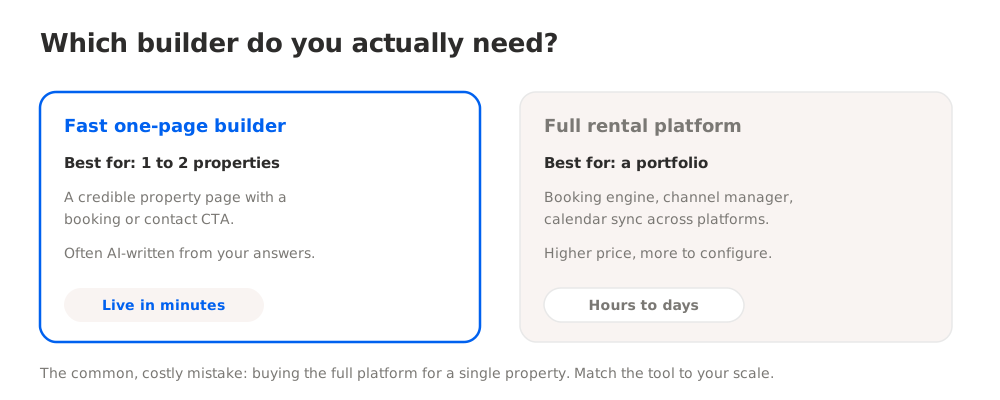
Hosts used to have two bad choices: hire a web agency for a four-figure fee, or wrestle with WordPress and give up halfway. Neither fit a host who just wanted one good page. Today the real decision is simpler, a fast one-page builder or a full vacation rental platform, and it hinges almost entirely on how many properties you run.
Here is how the two approaches compare on what matters for actually getting a site live.
| Factor | Fast one-page builder | Full vacation rental platform |
|---|---|---|
| Best for | One or two properties | A portfolio of properties |
| What you get | A credible property page, booking or contact CTA | Booking engine, channel manager, calendar sync |
| Copywriting | Often AI-generated from your answers | You write it, or import from listings |
| Time to live | Minutes to an hour | Hours to days |
| Starting cost | Free tier or low monthly | Higher monthly, tiered by properties |
| Overkill risk | Low | High for a single property |
The most common and expensive mistake is picking the full platform for a single property. A channel manager that syncs three OTAs is powerful and pointless if you have one cabin and take a handful of direct bookings a season. You pay more, spend a weekend configuring it, and get features you never use. Start with the level that matches your operation and add complexity only when volume demands it.
For most solo hosts reading this, the answer is the fast one-page builder. It delivers the two things that matter first, credibility and a fee-free channel for the guests who already know you, without the operational weight. If you already run several properties and juggle calendars across platforms, the full platform earns its price. The best website builders for Airbnb hosts comparison breaks down specific tools in each camp with pricing and pros and cons.
How to Build Your Airbnb Website: Step by Step
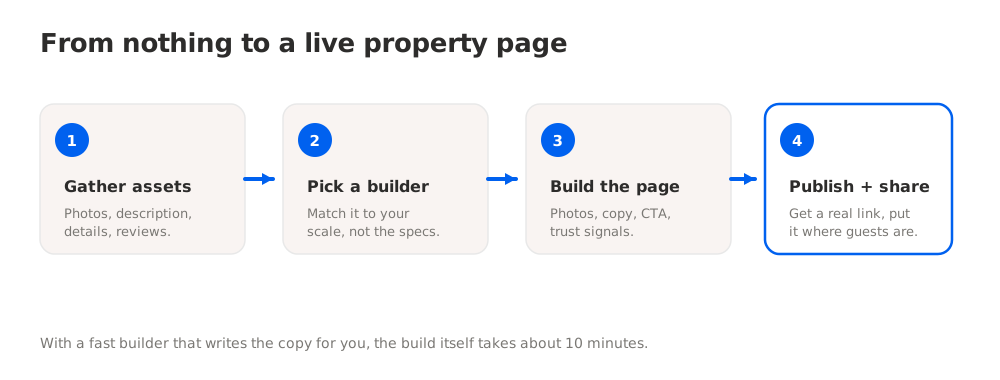
Here is a concrete build path for a solo host with one or two properties, from nothing to a live, bookable page.
Step 1: Gather your assets first
Before you open any tool, pull together what the page needs. This is what makes the build fast instead of a stop-start slog. Collect 5 to 8 of your strongest photos (the same quality you would put on a listing, or better), your best property description, the practical details (sleeping capacity, location area, house rules, check-in and check-out, parking, wifi, pets), and two or three genuine guest quotes. Common mistake: reusing tired listing text word for word. This page is your brand, so plan to warm it up.
Step 2: Choose your booking mechanism
Decide how guests will actually book, because it shapes the whole build. If you are comfortable confirming dates and taking payment by message or invoice, a contact-and-confirm page is enough and gets you live today. If you want guests to self-serve, plan for an embedded calendar and online payment. Most single-property hosts should start with contact-and-confirm and add automation later. Do not let a hunt for the perfect booking engine stop you from having any direct channel at all.
Step 3: Pick a builder that matches your scale
Match the tool to your operation, not to the longest feature list. For one or two properties, a fast one-page builder is the fit; for a portfolio needing calendar sync, a full platform is. This is where an Airbnb website builder like NiftySite suits a single-property host: it generates the page copy from a few answers, so you skip the blank page entirely, and publishes a clean one-page property site in about ten minutes. Pick the camp first, then the specific tool.
Step 4: Build the page
With a fast builder, this is the quick part. Answer the onboarding questions or fill in your details, add your photos, and review the generated copy. Lead with your strongest image and a one-line hook about what makes the stay special. Keep it to one page so a guest can see everything and act without hunting through a menu. Put your booking or enquiry CTA above the fold, and repeat it at the bottom. A short-term rental website converts best when the next step is always obvious.
Step 5: Add the practical details and trust signals
Fill in the specifics guests decide on: capacity, location area, house rules, check-in process, wifi, parking, pets. Then add the trust signals that replace a platform's built-in credibility, a few guest quotes, your name and a real photo, and a clear response promise. On a listing platform, the badge system does this work for you. On your own site, these details are what earn the booking, so do not leave them off.
Step 6: Publish and get a real web address
Publish the page and note its address. On a free plan you typically get a subdomain like yourplace.niftysite.co; upgrading unlocks a custom domain and gets the page indexed by Google so guests can find it by searching your property name. Either way, you now have a link that lives independently of any platform, which is the whole point of building your own site.
Step 7: Drive guests to it
A page nobody can find does not take bookings. Put the link where your guests already are: your Instagram bio, your checkout message, a welcome card or house manual in the property, and your email signature. When a past guest asks about returning, send the direct link instead of pointing them back to the listing. This is how a direct booking website starts paying off, by capturing demand you already earned before it leaks back onto the platform.
Tools to Build Your Airbnb Website
The right builder depends almost entirely on how many properties you run and whether you need automated, self-serve booking. Here is an honest breakdown.
| Tool | Best For | Starting Price | Setup Time |
|---|---|---|---|
| NiftySite | One credible property page, fast | Free / $15 per month | About 10 minutes |
| Lodgify | Multi-property booking engine + channel manager | Paid monthly, tiered | Hours to days |
| Hostfully | Portfolio hosts wanting a booking site + PMS | Paid monthly, tiered | Hours to days |
| Squarespace | Design-led custom site, willing to configure | Paid monthly | Several hours |
| Carrd | Bare one-page site, DIY design, lowest cost | Low annual price | 30 to 60 minutes |
For a solo host who wants a professional, findable property page without a software project, NiftySite is the closest fit. It works as an AI Airbnb website builder: answer a short set of questions, and it writes your page copy and publishes a clean one-page vacation rental website with your photos and a booking or contact CTA. It runs $15 per month with monthly billing and no annual lock-in, and there is a free tier so you can publish and try it first. It does not replace a channel manager, and it does not try to; it gives you the credible direct channel in the time it takes to make coffee.
For hosts running several properties who need synced calendars and an embedded booking engine across multiple platforms, a dedicated vacation rental website builder like Lodgify or Hostfully earns its higher price. Those tools handle operational complexity a single-property host does not have yet. Squarespace sits in between: capable and flexible, but you write your own copy and spend real time configuring it. Carrd is the budget one-page option, but you design it yourself with no niche templates and no AI copy. For a detailed side-by-side with pricing and pros and cons, see the best website builders for Airbnb hosts comparison.
Best Practices and Common Mistakes
A few habits separate a property site that earns fee-free bookings from one that just exists.
Best practices:
- Lead with photos and a hook. Guests decide fast. Put your strongest image and a one-line reason to stay at the very top of the page.
- Make the booking action obvious. One clear CTA above the fold and again at the bottom. Never bury "check availability" in a menu.
- Write in your own voice. Rewrite listing boilerplate so the page sounds like a real host, not a marketplace slot. This is your brand.
- Put the link everywhere. Instagram bio, checkout message, in-property welcome card, email signature. A website for Airbnb hosts only works if guests can find it.
Common mistakes:
- Over-buying software. Configuring a full channel manager for a single property is the fastest way to stall out and never publish. Start simple and add later.
- Waiting for the perfect booking engine. A contact-and-confirm page live today beats a self-serve calendar that launches in three months. Capture the enquiry now.
- Skipping trust signals. Without a platform's badge system, your own reviews, photo, and response promise are what earn the booking. Do not leave them off.
- Choosing a page Google ignores. A link-in-bio card that search engines cannot index means guests searching your property name will not find you. Confirm your page can be indexed.
Frequently Asked Questions
What is an Airbnb website builder?
An Airbnb website builder is a website tool a short-term rental host uses to create their own property site, independent of any listing platform. It builds a page that shows your place, describes it, and lets guests book or enquire direct. It is not an official Airbnb product; the term describes the job of building a website for an Airbnb-style rental. These range from fast one-page builders for a single property to full vacation rental platforms with booking engines and channel managers for a portfolio.
How do I build a website for my Airbnb?
Gather your assets first: 5 to 8 strong photos, a property description, the practical details, and a couple of guest quotes. Choose how guests will book (contact-and-confirm is fine to start). Pick a builder that matches your scale, a fast one-page tool for a single property. Build the page, add your details and trust signals, publish it to a real web address, and share that link everywhere your guests already are. With a builder like NiftySite that generates the copy for you, the build itself takes about ten minutes.
What does an Airbnb host website need to have?
Strong photos, a clear property description in your own voice, the practical details (capacity, location area, house rules, check-in, wifi, parking, pets), a way to book or enquire, trust signals like guest quotes and your name and photo, and a real web address you can share. It does not need a channel manager or dynamic pricing to start. Capturing the enquiry is enough to begin taking fee-free direct bookings.
Can I build an Airbnb website for free?
Yes, to a point. Several builders have a free tier that publishes a real page. With NiftySite, the free plan publishes a property page on a subdomain with no credit card and no trial countdown; upgrading unlocks a custom domain, Google indexing, analytics, and a contact form. Free tiers usually show a small badge and limit some features, which is the honest tradeoff for not paying. A full vacation rental platform with a booking engine generally does not have a usable free tier.
How long does it take to build an Airbnb website?
With a fast one-page builder, about ten minutes, because the tool generates the copy from your answers and you just add photos and adjust. A design-led builder like Squarespace takes several hours because you build and write it yourself. A full vacation rental platform with channel sync and a booking engine can take hours to days to configure properly. The single-property host who wants to be live today should choose the fast builder.
Is there an AI Airbnb website builder?
Yes. Several modern builders use AI to write your page copy from a few answers, which is what people mean by an AI Airbnb website builder. Instead of facing a blank page, you describe the property and the AI drafts the headline, description, and call to action, which you then edit into your own voice. NiftySite works this way and is built around getting a solo host live in about ten minutes. The AI handles the drafting; you supply the photos, the real details, and the final wording.
Do I have to leave Airbnb to build my own website?
No. Building your own site does not mean deleting your listing. Most hosts run both, using the platform to reach first-time guests and their own website to capture returning guests and referrals without the fee. Your website is a second channel you control, not a replacement on day one. The full case for how the two work together is in the direct booking vs Airbnb guide.
Will my Airbnb website show up on Google?
Only if the tool supports indexing. A real website builder publishes a page search engines can index, so guests can find you by searching your property or business name. Some link-in-bio style tools generate a page Google effectively ignores, which defeats the purpose. Before committing, confirm the builder gives you a genuine, indexable web page. With most builders, including NiftySite, indexing is tied to a paid plan while free pages stay unindexed.
What is the best website builder for a single Airbnb property?
For one property, the best fit is a fast one-page builder that gets you a credible, findable page without operational overhead. NiftySite suits this case: it generates the copy, publishes in about ten minutes, and costs $15 per month with no annual lock-in plus a free tier. A full vacation rental platform is overkill and overpriced for a single property. For a detailed comparison of specific tools, see the best website builders for Airbnb hosts roundup.
Do I need technical skills to build an Airbnb website?
No. Modern builders are made for hosts with no technical background: you answer a few questions, add photos, and publish, with no code and no hosting setup. An AI-assisted builder goes further by drafting the copy so you are not writing from scratch. The credible page and the fee-free channel come without any of the configuration a full booking platform would demand. What you bring is the photos, the real details, and a final read to make the copy sound like you.
The Bottom Line on Building Your Airbnb Website
Building your own Airbnb website is how you stop leaking the demand you earn from great stays back onto a platform that takes a cut of it. With the right Airbnb website builder, a credible, findable property page is a task you finish in a sitting, not a project you keep postponing. You get a page you control, a fee-free channel for the guests who already trust you, and a link you can put everywhere.
Three things to hold onto:
- Match the tool to your scale. One or two properties want a fast one-page builder; a portfolio wants a full platform with calendar sync. Do not overbuy.
- Cover the essentials, then publish. Strong photos, a clear description, the practical details, trust signals, and an obvious booking CTA. A credible page live today beats a perfect one next quarter.
- Get found and share the link. Confirm your page can be indexed, then put the address in your bio, your checkout message, and your welcome card.
If you are ready to build a property page and start taking direct bookings, NiftySite has a free forever plan with no credit card required, and Pro is $15 per month with no annual lock-in. You do not need software skills or a channel manager to own your own booking channel. You need one good page and a link you share everywhere your guests already are, and you can have it live in about ten minutes.
Last updated: June 2026. Pricing figures reflect published rates at the time of writing and may change; verify current pricing on each tool's site before purchasing.

Build your property page in about 10 minutes
Answer a few questions and get a credible one-page site with your photos, your description, and a direct booking CTA already written. No channel manager, no software project.
Build my property page freeFree forever plan, no credit card. Pro is $15/month, monthly billing, cancel anytime.